
For CTOs / Technical Decision-Makers · Intermediate · Informational · Solves: Webflow site that looks fine and ranks poorly, CMS items sharing one title, Unclear redirects after slug changes
Key takeaways
- Webflow gives you HTML, per-page metadata, sitemap, canonicals, and a redirect list. You still have to configure them.
- Bind unique SEO titles and descriptions on CMS templates.
- Set one production canonical origin and inspect live status codes on redirects.
- Custom code and pagination are where most Webflow SEO accidents happen.
Webflow SEO is not a mystery feature you turn on in Site Settings. The platform gives you clean HTML, per-page metadata, a generated sitemap, canonical controls, and a redirect list. Operators still ship duplicate CMS URLs, empty titles on collection items, pagination that should not be indexed, and custom code that breaks the head. The platform is capable. The implementation is usually the problem.
This is not a hiring guide. If you need to buy a build, the agency question is ownership and handoff. This article is what the product actually does, where it stops, and the mistakes I fix on live Webflow sites.
Webflow's own operator manual for this layer is Site-level SEO in The Webflow Way. Read that, then inspect your published HTML. The gap between those two is the real audit.
What the platform does well
Webflow outputs real HTML pages. That sounds basic until you have fought a client-rendered marketing site that sends Googlebot an empty shell. Static pages and CMS collection templates can carry unique titles, descriptions, Open Graph fields, and semantic structure if the Designer build uses real headings instead of styled divs.
- Per-page SEO titles and descriptions in Page Settings.
- CMS fields bound into those titles and descriptions so each item is unique.
- Automatic XML sitemap on paid hosting, listed for Search Console.
- Global canonical base URL that Webflow concatenates with each slug.
- 301 redirect list in Site Settings, including CSV import and wildcards.
- robots.txt you can edit, instead of hoping a plugin got it right.
Those are real advantages. They are also easy to misconfigure. A sitemap that includes noindex pages, a global canonical with a trailing slash that doubles every path, or a robots.txt that Disallows /blog are all Webflow-native failures. The UI allowed them. The operator published them.
Canonicals: the quiet duplicate factory
Set the global canonical URL in Site Settings to the exact production origin you want: protocol, hostname, and no extra slash at the end. Webflow then builds a self-referencing canonical per page from that base plus the slug. Get the base wrong and every page canonical is wrong.
Canonicalization is still Google's job to interpret. The tag is a hint. Google's duplicate URL consolidation guide is the rulebook. Self-referencing canonicals on the preferred URL are the default. Cross-canonicals belong on true duplicates, not on every similar case study.
Static pages can override the canonical in Page Settings. CMS items generally inherit the collection URL plus slug. If you need a CMS item to canonical to a different URL, that is a custom-field problem, not a checkbox. Do not solve it by pasting a second canonical into custom code while the global tag still fires. Two canonicals is how you tell Google you do not know which URL is real.
Also check www versus apex, HTTP versus HTTPS, and trailing slashes. Webflow hosting can redirect some of those at the domain level. Your canonical, your sitemap, and your internal links must all pick the same version. I still find sites where the nav uses trailing slashes, the canonical does not, and the sitemap uses a third host leftover from staging.
CMS collection SEO
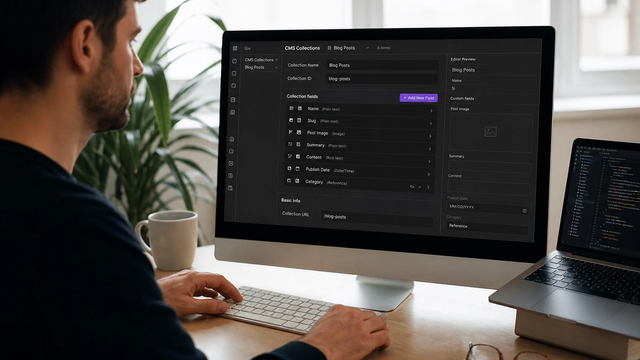
Collection templates are where Webflow SEO usually breaks. The template looks fine in the Designer with dummy content. In production, forty items share one title pattern like 'Blog' or the collection name, because nobody bound the SEO title to a field.
- Create explicit fields: SEO title, SEO description, and a slug you will not casually rename.
- Bind those fields on the collection template. Do not leave the template SEO title as a static string.
- Write a title formula you can live with, then edit outliers by hand. A 60-character field is not an essay.
- Give every item a unique H1 that matches the topic. The collection name is not an H1.
- Keep draft and archived items unpublished. Unpublished is not the same as published plus noindex if you never added noindex.
Slugs are permanent once they rank or earn links. Webflow will not magically preserve equity if you rename a slug and forget the redirect. Change a published slug only with a redirect rule in the same release. Treat the collection directory (/blog, /work, /customers) as part of the URL contract, not a label you redesign twice a year.
Reference fields and filtered collection lists can create extra indexable URLs if you build them as pages instead of in-page filters. A /blog/category/seo page is a decision. A client-side filter that changes nothing in the URL is a different decision. Mixing both without canonicals is how you split a topic across thin copies.
Pagination, filters, and index bloat
Webflow paginates collection lists when you tell it to. Those page-2 URLs can get crawled. Decide whether paginated list URLs are indexable. For most blogs, the item URLs are the ranking targets. The list is a hub. If paginated pages are thin copies of the hub, they should not compete.
There is no single magic robots trick that fits every site. Some teams noindex pagination. Some leave it indexable with a clear canonical to the hub. Some paginate with query parameters that never should have been in the sitemap. Pick one policy, implement it on the template, and confirm the sitemap does not list the junk.
Filter and search states are worse. If a 'filter by industry' control publishes a new path for every combination, you will generate thin pages that cannibalize the real work pages. Build filters that do not create indexable URLs unless that filtered view is a page you actually want ranked, with unique copy, not a leftover query string.
308 versus 301, and the redirects Webflow actually ships
Webflow's UI calls the feature 301 Redirects. That is the intent: a permanent move. In the wild, you should still inspect the live status code. Some hosts and CDNs serve 308 Permanent Redirect for the same job. Google treats 301 and 308 as permanent redirects for Search. Do not panic if a crawler reports 308 on a rule you entered as 301. Confirm it is permanent, one hop, and pointed at the final URL.
Google's redirects and Search documentation is the reference. Permanent redirects are for permanent moves. Temporary redirects (302, 307) are for temporary moves. Locale negotiation in Webflow has used temporary redirects, which is a different problem than a slug change.
Operator mistakes I still see:
- Slug changed, redirect never added.
- Redirect to the homepage for URLs that had a closer equivalent.
- Chains: old to older to new, because nobody flattened the list.
- Full absolute URLs in the old path field, so the rule never matches.
- More than about 1,000 individual rules when a wildcard would have covered a directory.
Webflow recommends keeping redirect count reasonable because rules ship with the site manifest. Use wildcards with a capture group when you move a whole directory. Test a sample of old URLs after publish. Do not assume the CSV imported the way you hoped.
Hosting, domains, and SSL
Webflow hosting gives you SSL, a CDN, and the publishing pipeline. SEO still depends on which host Google sees. Point DNS correctly. Prefer one hostname. Redirect the rest in one hop. Turn on SSL and make sure mixed content does not remain from old HTTP asset URLs in rich text.
The webflow.io subdomain should not be indexed as a twin of production. Use noindex and a robots restriction on the staging subdomain if it must stay public, or password it. I have inherited launches where Search Console had two properties fighting, because someone submitted the.io sitemap and the custom domain sitemap.
Custom code hosting limits matter when you bolt on a reverse proxy or Cloudflare in front. If you add a proxy, you now own cache headers, trailing-slash rules, and which host is canonical. Webflow cannot save you from a proxy that serves a different HTML than the Designer preview.
Custom code is where Webflow SEO goes to die
Project head code, page head code, and embed components are powerful. They are also how you duplicate analytics, inject a second canonical, block rendering with a tag manager, or load a chat widget on every CMS item. Treat custom code like production code. One owner. A changelog. A removal date for experiments.
- Do not paste schema generators into the site head on top of native fields.
- Do not load Google Tag Manager with fifteen dead pixels on the blog template.
- Do not hide primary copy inside an embed that requires JavaScript to paint.
- Do not add rel=nofollow to internal links because a YouTube video told you to.
Semantic structure is still a Designer job. Use one H1. Use heading levels in order. Put main content in real text nodes, not background images of text. Webflow will not stop you from building an inaccessible artboard. Googlebot is not required to reconstruct your layout from absolutely positioned divs.
If the question is who should own the workspace after the build, that is how to choose a Webflow agency without getting locked in. If the question is whether Webflow is even the right CMS, use Framer vs Webflow. Then run the technical SEO audit checklist against the published host, not the Designer preview.
An operator checklist before you call it done
- View source on home, a service page, and a CMS item. Confirm title, description, canonical, H1.
- Open /sitemap.xml. Confirm only 200, indexable, canonical URLs.
- Open robots.txt. Confirm you did not Disallow money paths.
- Crawl pagination, tag, and filter URLs. Decide indexation on purpose.
- Test ten old URLs if slugs ever changed.
- Submit the production sitemap in Search Console. Do not submit staging.
Webflow SEO fails when people assume the platform did the thinking. It did the HTML. You still have to pick URLs, titles, canonicals, and redirects. If you want a second pass on a live project, send the custom domain and the webflow.io URL. I will tell you which one Google is treating as the site.
Implementation table
| Fix | Problem | What to change | Metric | Tool |
|---|---|---|---|---|
| Canonical origin | www, HTTP, staging, or trailing-slash mismatch | Set global canonical to production host. Align sitemap and internal links. | One preferred host in Search Console | URL Inspection |
| CMS SEO fields | Shared titles on collection items | Bind SEO title and description fields on the template. | Unique titles in a crawl export | Crawler |
| Redirect list | Slug changes without rules | Add 301/permanent rules, flatten chains, test old paths after publish. | Old URLs return one hop to 200 | Crawl + headers |
Webflow looks fine in the Designer and confused in Search Console?
Send the custom domain and a CMS URL. I will check canonicals, sitemap, redirects, and collection titles against what Google actually indexed.
Book a Webflow SEO reviewSources & references